

The Rs 0 AI Marketing Stack: Free Tools and Workflows for Founders and Small Teams (2026)
A 5-layer framework, 20 free tools with their real limits, eight ready-to-run workflows, an hours-saved ROI table, a 30-day rollout and a rule for when to pay.
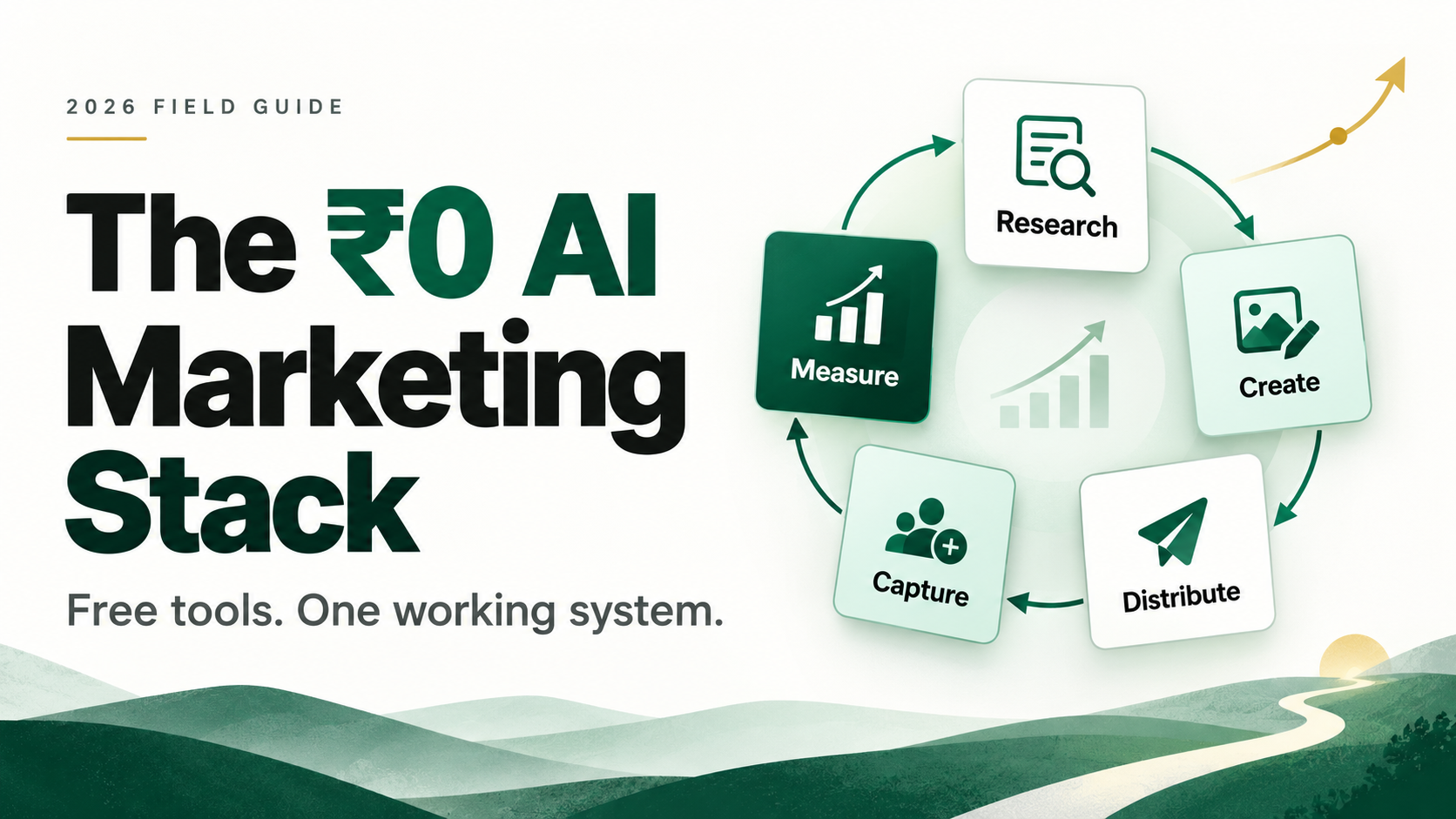
Short answer: You can run a working AI marketing engine in 2026 without spending a rupee on software. You’ll pay in time and setup instead.
Founders keep asking me which tools to buy. My answer: none yet. Free tiers can take a small team to its first steady inbound pipeline. The catch is that most people stack them randomly and end up with twelve logins and no system.
Here’s the system: a 5-layer framework, 20 free tools mapped to those layers with their real limits, eight ready-to-run workflows, an hours-saved ROI table, a 30-day rollout plan, and a rule for when to start paying.
The framework: the 5-layer Zero-Rupee Stack
Pick one tool per job, not three. Every layer should hand off to the next one.
- Research: know what your buyer asks, searches and complains about.
- Create: turn that research into posts, pages, emails and visuals.
- Distribute: get it in front of people on a schedule, not on mood.
- Capture and nurture: turn readers and outbound prospects into contacts, and contacts into conversations.
- Measure: find out what actually moved pipeline, then feed that back into Research.
The loop matters more than the tools. A stack that skips Measure is just a content hobby.
The stack: 20 free tools, mapped to the layers
Limits were checked in late 2026. They change often, so confirm on each pricing page.
| Layer | Tool | What the free tier gives you | Use it for |
|---|---|---|---|
| Research | NotebookLM | 100 notebooks, 50 sources each (limits) | Load call notes, reviews, competitor pages; ask for pain points |
| Research | Google Search Console + Google Trends | Free | Real queries you already rank for, and rising topics |
| Research | Google Alerts | Free, with RSS delivery | Competitor and category monitoring |
| Create | ChatGPT, Claude or Gemini (free tiers) | Daily usage caps | First drafts, repurposing, personalisation, summaries |
| Create | Canva Free | Up to 200 standard AI uses, 1 brand kit (3 colours) (pricing) | Carousels, banners, testimonial cards |
| Create | Gamma Free | 400 one-time AI credits, Gamma branding (details) | Sales decks, webinar recap slides |
| Distribute | Buffer Free | 3 channels, 10 queued posts per channel (details) | LinkedIn, Instagram and X scheduling |
| Capture | Tally | Unlimited forms and submissions, fair use (pricing) | Lead magnets, demo requests, feedback surveys |
| Capture | Cal.com Free | 1 user, unlimited event types and calendars (pricing) | Booking links in emails and posts |
| Outbound | Apollo Free | Monthly free credits, 2 sequences (details) | Finding and emailing your ICP |
| Nurture | HubSpot Free CRM | 2 users, 2,000 marketing emails a month (limits) | Contacts, one pipeline, deal tracking |
| Nurture | Brevo Free | 300 emails a day, large contact allowance (review) | Newsletters and welcome sequences |
| Nurture | WhatsApp Business app | Free app | Quick replies and follow-ups for Indian buyers |
| Glue | n8n Community Edition | Free to self-host, almost the full feature set (details) | Moving data between all of the above |
| Glue | Google Sheets | Free | The shared database every workflow reads and writes |
| Measure | GA4 + Microsoft Clarity | Free | Traffic sources, heatmaps, session replays |
| Measure | Looker Studio | Free native GA4, Search Console and Sheets connectors (guide) | One weekly dashboard |
| Measure | Bing Webmaster Tools | Free AI Performance report (explainer) | Counting your citations in Copilot and Bing AI answers |
One caveat: n8n is free software, but it needs somewhere to run. Start on your laptop, or move to a small VPS later (about $4 to $7 a month, per this breakdown). That’s the only line that might break the Rs 0 promise.
Eight workflows to run this month
Workflow 1: The 2-hour weekly content engine
- Monday (20 minutes): pull your top queries from Search Console. Load last month’s call notes into NotebookLM and ask for the 3 questions buyers ask most, in their own words.
- Draft (40 minutes): draft one pillar piece on the top question with an LLM. Add one story or number only you have.
- Repurpose (30 minutes): have the LLM repurpose it into 5 LinkedIn posts, a newsletter and a carousel script. Design the carousel in Canva.
- Schedule (30 minutes): queue it all in Buffer.
Workflow 2: Lead capture that nurtures itself
- Put a Tally form behind a useful lead magnet: a checklist, template or calculator.
- Send Tally’s webhook to n8n, which creates the contact in HubSpot and adds it to a Brevo list.
- Brevo sends a 3-email welcome series on days 0, 3 and 7: the asset, a short case story, then a soft ask to book a call.
- Add one n8n rule: if an answer signals high intent (say, team size above 20), alert the founder instantly. Speed to lead beats any sequence.
Workflow 3: The monthly AEO/GEO visibility check
- List 10 questions your buyer would ask an AI assistant, like “best [category] tool for Indian mid-market companies.”
- Ask each one in ChatGPT, Gemini and Perplexity. Log it in a Google Sheet: were you mentioned, were you cited, or who showed up instead?
- For each miss, fix one page: a 2-line direct answer at the top, an FAQ block, a comparison table, and identical brand facts everywhere. My AEO checklist for B2B SaaS walks through each fix.
- Re-run the same questions next month. That trend line is your GEO report.
Workflow 4: 30-minute daily outbound
- Build one tight ICP filter in Apollo: industry, headcount, role, country. Save it. Free credits are scarce, so reveal emails only for accounts that fit.
- Each morning, pick 10 prospects. Paste each one’s LinkedIn headline and company page into an LLM and ask for one sentence that ties their likely pain to your product.
- Send through one Apollo sequence: day 1 email, day 3 LinkedIn connect, day 6 follow-up. Put your Cal.com link in every email.
- Log replies in HubSpot. Every Friday, copy the subject lines and opening lines that got replies into your Sheet. That becomes your messaging library.
Workflow 5: One webinar, 15 assets
- Run a 30-minute LinkedIn Live or YouTube Live with a customer or an expert. Both platforms are free to stream on.
- Drop the transcript into NotebookLM. Ask for the 10 most quotable lines, the 3 strongest arguments, and the questions the audience asked.
- From that, make 5 LinkedIn posts, 2 carousels in Canva, 1 recap deck in Gamma, 1 blog post and 1 newsletter.
- Turn the audience questions into an FAQ block on your site. Real buyer questions are exactly what AI answer engines quote.
Workflow 6: The automated competitor radar
- Set Google Alerts for each competitor’s name, your category and two or three buyer pain keywords. Choose RSS delivery.
- In n8n, read those RSS feeds once a week and pass the new items to an LLM with one prompt: “Summarise what changed and what it means for our positioning.”
- Have n8n email you the digest every Monday morning.
- Each month, update one battlecard or comparison page based on what you learned.
Workflow 7: The customer proof engine
- After onboarding or a project ends, send a 3-question Tally form: a 0 to 10 score, what changed for them, and permission to quote.
- n8n routes every 9 or 10 with permission into a Sheet, and sends you a reminder to ask for a review or a 15-minute case study call.
- Turn the best quotes into testimonial cards in Canva and add them to your posts, landing pages and sales deck.
- Write a short case study page for each one, with the numbers in the first two lines. Proof pages convert humans and get cited by AI engines.
Workflow 8: The 15-minute Monday dashboard
- In Looker Studio, connect GA4 and Search Console natively. Export HubSpot deals to a Google Sheet weekly and connect that too.
- Track five numbers only: organic clicks, new contacts, meetings booked, pipeline created, and the conversion rate from contact to meeting.
- Once a month, add Bing Webmaster Tools’ AI citation count and your Workflow 3 sheet. That’s your AI visibility line.
- Every Monday, ask one question: what one thing do we double down on this week?
The ROI math, and when to start paying
ROI comes from two places: the money you don’t spend, and the hours you get back.
The money. The paid versions of this stack cost about $199 a month for a two-person team, so roughly $2,400 a year stays in the bank while you find out what works. That covers HubSpot Starter at $20 per seat (pricing), Apollo Basic at $49 (pricing), Buffer at $5 per channel, Canva Pro at $15, Tally Pro at $29, n8n Cloud at about $20, Cal.com Teams at $12, Gamma Plus at $10 and Brevo Starter at $9.
The hours. This is the bigger number. The estimates below are illustrative, so time your own week before and after and swap in your numbers.
| Workflow | Manual (hours/week) | With the stack (hours/week) | Hours saved |
|---|---|---|---|
| 1. Weekly content engine | 8 | 2 | 6 |
| 4. Daily outbound | 6 | 2.5 | 3.5 |
| 5. Webinar repurposing | 5 | 1.5 | 3.5 |
| 2. Lead capture and nurture | 2 | 0.5 | 1.5 |
| 6. Competitor radar | 2 | 0.5 | 1.5 |
| 8. Monday dashboard | 2 | 0.5 | 1.5 |
| 3. AEO/GEO check | 1.5 | 0.5 | 1 |
| 7. Customer proof engine | 1.5 | 0.5 | 1 |
| Total | 28 | 8.5 | 19.5 |
That’s about 84 hours a month. If a founder’s hour is worth Rs 1,500, the stack gives back roughly Rs 1.27 lakh a month in time, before it books a single meeting.
Use one rule to decide when a layer earns a paid seat:
Upgrade if (hours lost to workarounds per month × your hourly value) > monthly price
The usual upgrade triggers:
- Brevo: your list passes 300, so one newsletter takes two days to send.
- Apollo: you run out of free credits by the second week, every month.
- HubSpot: a third person needs CRM access, or you need multi-step automation.
- Buffer: you need more than 3 channels, or real analytics.
- Canva or Gamma: you burn through your AI allowance before the month ends.
- Cal.com: a second person needs to take demo calls (round-robin).
Upgrade one layer at a time, starting with whichever one slows revenue.
The 30-day rollout plan
Don’t switch on all eight workflows at once. Add one layer a week, so each habit sticks before the next one lands.
| Week | Set up | Workflows to start | Done when |
|---|---|---|---|
| 1 | Search Console, Bing Webmaster Tools, GA4, Clarity, NotebookLM | 3 (AEO/GEO check) | You have a baseline: clicks, AI citations, and your 10-question sheet |
| 2 | Canva, Gamma, Buffer, Google Alerts | 1 (content engine), 6 (competitor radar) | Two weeks of posts are queued |
| 3 | Tally, Cal.com, HubSpot, Brevo, n8n | 2 (lead capture), 7 (proof engine) | A test lead flows from form to CRM to email with no manual step |
| 4 | Apollo, Looker Studio, WhatsApp Business | 4 (outbound), 5 (webinar), 8 (dashboard) | Your first Monday dashboard shows all five numbers |
Five mistakes that kill a free stack
- Too many tools, no owner. Every tool needs one person who opens it weekly. If nobody does, delete it. (Here’s how to audit a bloated stack.)
- No single source of truth. Pick HubSpot or a Google Sheet as the master list. Two “master” lists means zero.
- Publishing raw AI drafts. Readers and AI engines both reward specifics. Add one real story, number or opinion to every piece.
- Burning free credits on bad-fit leads. Apollo and Gamma credits are scarce. Tighten your ICP before you spend them.
- Measuring activity, not pipeline. Posts published is not a metric. Meetings booked is.
The takeaway
Tools don’t build pipeline. Loops do. Set up the five layers, run the eight workflows for 90 days, then let the data tell you where to spend.
PS: The most expensive tool in any stack is the one nobody opens after week two. Free tiers have a hidden benefit: they show you which habits stick before you pay for them.
Sources
- NotebookLM Help: plans and usage limits
- Canva: plans and pricing
- Gamma: plans and pricing
- Buffer Help Center: how many posts can I schedule in advance?
- Tally: pricing
- Cal.com: pricing
- Apollo: building a prospect list on the free plan without wasting credits
- Apollo: pricing
- HubSpot Product & Services Catalog: free tools and limits
- HubSpot: CRM pricing
- Solopreneurship.eu: Brevo review (2026)
- n8n Docs: Community Edition features
- ExpressTech: how to self-host n8n in 2026, with real costs
- Looker Studio Masterclass: Google connectors in Looker Studio
- Search Engine Land: Bing Webmaster Tools officially adds AI Performance report